What is Cute World Craft?
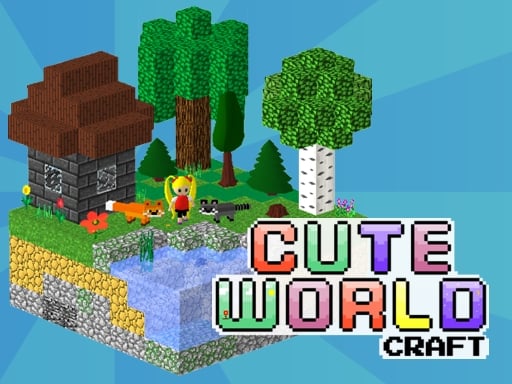
Cute World Craft is an enjoyable open-world sandbox title with an interface that lets your imagination run free! The game mixes the best features of Minecraft and Portal for building, exploring, and creating game levels. Build quaint little doll houses, a huge castle, or maybe the fastest small town in switch-town-a-like, or else let's go for survival mode and gather resources. Clash with foes, collect unique masks, and take down the Final Boss, Hivot!
How to Play
Start by using the WASD or arrow keys to move the character around. Hold down the left mouse button (LMB) to work with tools and to place blocks. Press the spacebar to jump, and double-press it in Creative mode to fly. Press E to pick up and drop objects, F to bring up your inventory, and C to collect resources.
Gameplay & Objectives
In Cute World Craft, you get to choose between Creative mode that grants unlimited resources for free building and exploration and the Survival mode that keeps you busy gathering resources to build a shelter and survive through dark nights. Objectives are slightly different in each mode: build gorgeous structures, create an interactive game level, or pursue potential adventurers to defeat the fiend named Hivot and save children detained by him.
Game Features
- 100 Standard Blocks: From cobblestones in Minecraft to sand, bricks, and more.
- 400+ Dynamic Physics Objects: Level creation will engage users with decorations, checkpoints, and timers.
- 24 Ready-Made Blocks: Basic starts for buildings and big trees.
- Musical Blocks: Design simple tunes for your world.
- Symmetry Mode: Fast building by mirroring cubes for symmetrical design.
- Mobile Interface: Tablets and smartphones have their version.
- Customizable Settings: FOV, render distance, shadows, and more.
- Save & Share: Save your work and share your projects for others to play!
How to Start
Download and install Cute World Craft for whichever platform you want to use. After installation, create an account and start vetoing the infinite possibilities of this creative sandbox world.
Tips & Tricks
- Plan Your Builds: Sketch before you start placing blocks to make sure it's the way you want it.
- Use Symmetry Mode: It saves a lot of time in terms of symmetrical structure creation.
- Experiment with Physics Objects: Have fun carrying out interactive level construction using bouncing balls and trampolines.
- Gather Resources in Survival Mode: Collect resource materials during the day, and build and defend during the night.
- Defeat Hivot: Collect enemy masks to build a compass that leads to the final boss.
Platforms
Over PC, Cute World Craft comes with versions customized for Windows and macOS. It also includes a mobile interface for tablets and smartphones.
Developer & Background
Cute World Craft is developed by guys who are dreaming about creative and sandbox games and whose game is inspired by the mechanics of Minecraft and Portal. Cute World Craft is supposed to provide fun and engaging entertainment for people of all ages.
Play Unblocked
The game is available on most school and home networks, giving you enough opportunities to play during break times or after school.
FAQ
Q: Can I play with my friends? A: Yes! You can share your creations and play together in the same world.
Q: Is Cute World Craft suitable for younger players? A: Absolutely! The game has a cute, friendly interface and is designed to be enjoyed by players of all ages.
Q: What happens if I get lost in Survival mode? A: Use the masks you collect from enemies to create a compass that will help you find your way back to your base.
Cute World Craft is an exciting and high-quality free online adventure game available exclusively on CrazyGames-Poki. This premium HTML5 browser game delivers instant entertainment without any downloads, installations, or registrations required.
Why Play on CrazyGames-Poki?
- ✅ 100% Free - No registration or download required
- ⚡ Instant Play - Loads in seconds in your browser
- 📱 Cross-Platform - Works on PC, Mac, iOS, Android
- 🔒 Safe & Secure - Tested for quality and safety
💡 Next Recommended Game
Try Angry Heros for more adventure fun!