What is Nikosan Quest?
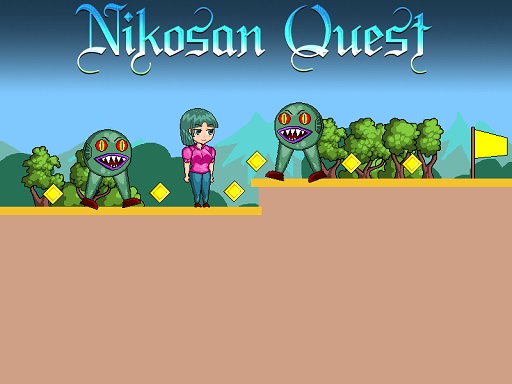
Nikosan Quest is a fun-filled 2D platform game where you control the cute anime girl Nikosan. Your job here: Collect all the yellow cubes, sidestep perilous obstacles like monsters, spikes, rotating blades, and rush to the yellow flag to unlock the next level. The game has 8 challenging levels that ramp up on difficulty, making it an ideal challenge for those who love it with some anime coolness.
Controls
Use the WASD keys or the Arrow keys to move Nikosan around. Press the W or Up arrow key twice to do a double jump, which will enable you to reach those out-of-the-way positions and to get away from obstacles.
Gameplay & Objectives
The main objective here is to gather all the yellow cubes for each level while staying clear of enemies and hazards. When all of them are collected, make your way toward the yellow flag that will assist in moving from the present level to the next one. Levels grow harder as you move onwards, so this would be a nice platform and reflex time challenge.
Game Features
- 8 levels with escalating difficulty
- Collect all yellow cubes
- Avoid monsters, spikes, and rotating blades
- Double jump ability
- Cute anime girl protagonist
How to Start
Download the game from one of many trusted sources, install, and launch the game. Select "New Game" and start your adventure.
Tips & Tricks
- Learn the layout of every level so you don't get caught in a corner.
- Use your double jump to get to far-hitting platforms and avoid danger.
- Look out for hidden cubes tucked away in tricky spots.
- Practice your timings to nail that jump, or you'll end up falling on spikes and monster ambushes.
Platforms
Nikosan Quest is available on PC, macOS, and Linux. Compatible with most modern browsers, you can also play this directly in your web browser without the need to download.
Developer & Background
Nikosan Quest was developed by a small indie team passionate about making fun, cool platform games. Taking inspiration from the classic 2D platformers, they wanted to give an anime flavor to the genre, bringing about a charming-yet-difficult game.
FAQ
Q: How many levels are in Nikosan Quest? A: There are 8 levels in total, each of which increases in difficulty.
Q: What controls do I use? A: You can use WASD or Arrow keys for movement, and W or the Up arrow key twice for a double jump.
Q: Are there any hidden secrets in the game? A: There sure are; keep your eyes open for hidden cubes and secret paths that might give away extra points or shortcuts.
Q: Can I play this game on my mobile device? A: Currently, Nikosan Quest is available on PC, macOS, Linux, and as a web browser game. Mobile versions are not yet available.
Nikosan Quest is an exciting and high-quality free online arcade game available exclusively on CrazyGames-Poki. This premium HTML5 browser game delivers instant entertainment without any downloads, installations, or registrations required.
Why Play on CrazyGames-Poki?
- ✅ 100% Free - No registration or download required
- ⚡ Instant Play - Loads in seconds in your browser
- 📱 Cross-Platform - Works on PC, Mac, iOS, Android
- 🔒 Safe & Secure - Tested for quality and safety
💡 Next Recommended Game
Try Choco Benno for more arcade fun!