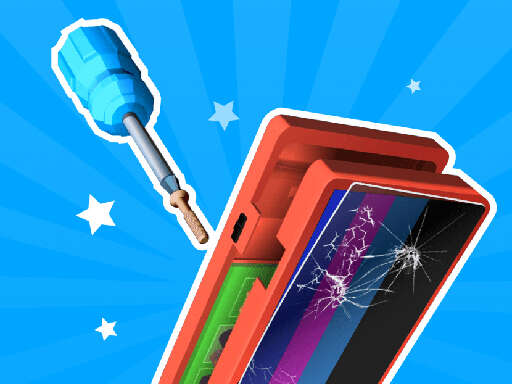
Have you ever found yourself staring at a malfunctioning piece of tech, scratching your head in confusion? Well, unfortunately, electronics do break easily. But this is where you come in! Welcome to Repair It, the ultimate challenge that puts you in the shoes of a tech wizard. Open up the electronics, switch the damaged parts, clean up the dust, apply some thermal paste, reassemble, and voila, like brand new! Level up your expertise and unlock new devices to repair!
How to Play
Ready to save the day? Here’s how you'll get started:
Choose Your Device: When you first boot up Repair It, you'll be presented with a variety of gadgets to choose from. Whether it’s a smartphone, tablet, or even a gaming console, pick the device that interests you and dive in.
Inspect the Damage: Before you start tinkering, take a good look at the damaged parts. Are there any cracks, heat issues, or a lack of power? Identifying the problem is the first step to a successful repair.
Gather Your Tools: From screwdrivers to thermal paste, you’ll need a variety of tools to fix the device. Use your inventory to find the right tools for the job.
Open Up the Device: Carefully disassemble the device, being mindful not to damage any of the internal components. Remember, precision is key!
Replace the Parts: Swap out the damaged parts with the new ones you've gathered. Make sure to connect everything securely before moving on.
Clean and Cool: Use your microfiber cloth to wipe away the dust, and apply a small amount of thermal paste to keep the device running smoothly.
Reassemble: Put everything back together with care, ensuring that all components are in place and the device is properly sealed.
Test the Device: After reassembly, power on the device and test all its functions. Did you fix it? If so, celebrate your victory! If not, it's back to the drawing board.
Level Up: As you successfully repair more devices, you’ll unlock new challenges and gadgets to test your skills. The more devices you fix, the higher your rank and the more complex the repairs become.
Why Play Repair It?
Repair It isn't just about mending broken gadgets; it's about the thrill of problem-solving and the satisfaction of bringing something back to life. Whether you're a tech enthusiast or just want to add some excitement to your gaming routine, this game has something for everyone. Plus, it's a great way to learn about the inner workings of electronics and the importance of attention to detail.
So, what are you waiting for? Unleash your inner tech hero and start your repair journey in Repair It today!
About Repair It - Free Online Hypercasual Game
🎮 Quick Info: Hypercasual Game | ⭐ Rating: 6 plays | 🆓 Free | 📱 Works on PC, Mobile & Tablet | ⚡ No Download Required
Repair It is an exciting and high-quality free online hypercasual game available exclusively on CrazyGames-Poki. This premium HTML5 browser game delivers instant entertainment without any downloads, installations, or registrations required.
📂📂 Category:Hypercasual
🎯🎯 Platform:Web Browser (HTML5)
💰💰 Price:Free
👥👥 Mode:Single Player
📅📅 Updated:2026-06-11
Why Play on CrazyGames-Poki?
✅ 100% Free - No registration or download required
Playing free online games at CrazyGames-Poki is incredibly simple and requires no technical expertise. Our platform uses cutting-edge HTML5 technology that works seamlessly across all modern devices and browsers.
Step-by-Step Guide:
Browse Categories: Explore our extensive game library organized by genre, popularity, or new releases
Select a Game: Click on any game thumbnail or title that catches your interest
Wait for Loading: Games typically load within 3-5 seconds depending on your internet connection
Read Instructions: Most games display brief control instructions before starting
Start Playing: Click the play button and enjoy instant gaming fun!
Save Favorites: Bookmark games you enjoy to quickly access them later
Technical Requirements
Browser: Chrome 90+, Firefox 88+, Safari 14+, Edge 90+, or Opera 76+
JavaScript: Must be enabled in your browser settings
Internet Connection: Minimum 3 Mbps for smooth gameplay (5+ Mbps recommended)
Screen Resolution: Minimum 800x600 (1024x768 or higher recommended)
RAM: At least 2GB available memory (4GB+ for optimal performance)
💡 Pro Tip:For the best gaming experience, we recommend using Google Chrome or Mozilla Firefox with hardware acceleration enabled. Close unnecessary browser tabs to free up system resources.
Troubleshooting Common Issues
If you experience any problems while playing:
Game won't load? Try refreshing the page (F5 or Ctrl+R / Cmd+R)
Laggy performance? Lower your browser's hardware acceleration or close other applications
No sound? Check that your browser isn't muted and volume is turned up
Controls not working? Ensure JavaScript is enabled and try clearing your browser cache
More Games Like Repair It
If you enjoyed Repair It, check out these similar hypercasual games hand-picked by our editors