What is School Bus 3D Parking?
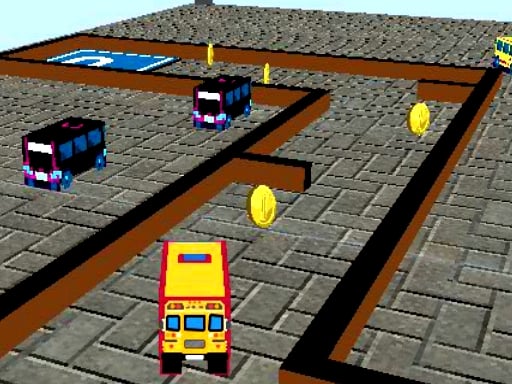
School Bus 3D Parking is a thrilling online game that brings the excitement of parking challenges right to your screen! Whether you're on your PC or mobile device, this free-to-play game is designed to offer endless fun without the need for downloads. In a world where precision meets adventure, you'll take on the role of a skilled bus driver tasked with parking a variety of school buses in tight spots. The game's 3D graphics will immerse you in the action, making every level a new challenge!
How to Play School Bus 3D Parking:
Nailing the Controls: Navigating the parking lot is a breeze! Use the arrow keys on your PC or simply tap on the buttons on your mobile device to steer the bus. With responsive controls, you'll find yourself easily maneuvering through the obstacles.
The Objective: The primary goal is simple yet challenging: park the school bus in the designated spot without crashing into walls or other obstacles. It sounds easy, but as you progress, the spots get smaller and the levels get tougher!
Leveling Up: As you master the art of parking, you'll collect coins scattered around the parking lot. These coins are crucial for unlocking new buses and levels. The more coins you collect, the more variety you'll have in your fleet and the further you'll advance in the game.
Avoiding the Obstacles: Throughout your journey, you'll need to avoid collisions with walls, posts, and other vehicles. Precision is key, so keep an eye on your surroundings and be prepared to make split-second decisions.
Why Play School Bus 3D Parking?
- Entertaining and Engaging: With its simple yet addictive gameplay, School Bus 3D Parking is perfect for a quick gaming fix or a full-on gaming marathon.
- Free and Accessible: Available on PC and mobile, this game is always ready to be played, anytime, anywhere.
- Challenging but Rewarding: Each level is designed to test your skills, but with enough practice, you'll see yourself mastering the art of bus parking.
So, what are you waiting for? Hit the roads of School Bus 3D Parking and see if you've got what it takes to become the ultimate bus driver! With its fun and intuitive gameplay, this game is sure to become a favorite among gaming enthusiasts everywhere. Get ready to navigate the parking lot and make some unforgettable memories—without ever leaving your home!
School Bus 3D Parking is an exciting and high-quality free online puzzle game available exclusively on CrazyGames-Poki. This premium HTML5 browser game delivers instant entertainment without any downloads, installations, or registrations required.
Why Play on CrazyGames-Poki?
- ✅ 100% Free - No registration or download required
- ⚡ Instant Play - Loads in seconds in your browser
- 📱 Cross-Platform - Works on PC, Mac, iOS, Android
- 🔒 Safe & Secure - Tested for quality and safety