What is The Windows Game?
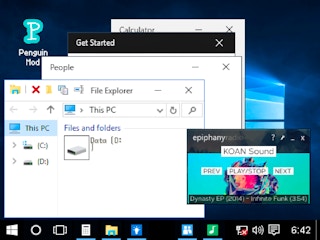
Step into a world where you can relive the nostalgic experience of using Windows 10, but with a twist! The Windows Game is an innovative simulator that brings the original Windows 10 operating system to life, complete with a plethora of applications and features. It's not just a game; it's a full-fledged Windows 10 experience designed to challenge and entertain you.
How to Play
The Windows Game is designed to be intuitive, so even if you're not a tech whiz, you'll be able to navigate it with ease. Here's how you can start:
- Launch the Simulator: Open The Windows Game and you'll be greeted with the familiar Windows 10 login screen.
- Explore the Interface: Once logged in, you'll find a variety of applications at your fingertips, from classic games to productivity tools.
- Use the Applications: Click on any application to open it. Whether you're shooting, writing, or exploring, the applications respond as they would on a real Windows 10 machine.
- Multitask: Take advantage of the real multitasking feature to switch between applications seamlessly.
- Customize Your Experience: Rearrange and pin icons on the taskbar, just like in the real Windows 10. You can even log in and out via the power menu, just like on your home computer.
Features
Real Multitasking
The Windows Game isn't just a visual replica; it's a fully functional simulation. With state and layer tracking, you can multitask with ease, switching between applications and maintaining their state as if you were using a real Windows 10 PC.
Authentic Interface & Sound Effects
Every detail has been meticulously recreated to ensure an authentic experience. From the iconic start menu to the familiar sound effects, The Windows Game brings the Windows 10 environment to life.
Detailed Recreation of Windows 10 Behaviors
- Icon Management: Rearrange and pin icons on the taskbar, just as you would on your actual computer.
- Power Menu: Log in and out of your account using the power menu, complete with shutdown and restart options.
High Quality Applications
The Windows Game comes packed with a variety of high-quality applications, including games, music players, and a word processor. Whether you're looking for entertainment or productivity, you'll find it all here.
Built for Multiplayer and Easy Modification
The Windows Game is designed to be both fun and versatile. It supports multiplayer gameplay, allowing you to play with friends, and is easy to modify, so you can add your own touch to the experience.
Many Other Nice Touches
From hidden easter eggs to subtle animations, The Windows Game is full of surprises. Discover these hidden gems as you explore the simulator.
So, are you ready to dive into the world of The Windows Game? Get ready to relive the Windows 10 experience in a whole new way!
The Windows Game is an exciting and high-quality free online simulation game available exclusively on CrazyGames-Poki. This premium HTML5 browser game delivers instant entertainment without any downloads, installations, or registrations required.
Why Play on CrazyGames-Poki?
- ✅ 100% Free - No registration or download required
- ⚡ Instant Play - Loads in seconds in your browser
- 📱 Cross-Platform - Works on PC, Mac, iOS, Android
- 🔒 Safe & Secure - Tested for quality and safety